Moodle Scheduled Task & MySQL Going Away
Have you ever had the following error in one of your Moodle scheduled tasks or even when you’ve been upgrading Moodle & have noticed it in the MySQL logs ??

What this means is that and the size of the file it is trying to write is bigger than the variable currently allows, MySQL has tried to do as you’ve asked and couldn’t at which point it has packed its bags and goes home..
You might see it if you ever run a full Sync users with Entra AD on a large scale Moodle site.

The task will then just restart and fail the next time as well and keep looping causing your sync and Moodle site get more and more out of date with your Azure AD.
How to fix.. its pretty simple really, you just need to get MySQL’s connection to be able to write larger sized data files packages.
The default for max_allowed_packets on your Moodle’s MySQL database is likely to be 16mb
show global variables like '%max_allow%';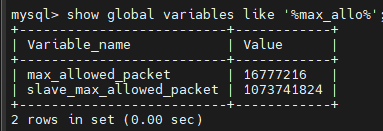
You want to change this to at least 256mb’s
You do this with the following line on your MySQL command line
set global max_allowed_packet = 268435456;
What is 268435456 ??
268435456 / 1024 / 1024 = 256 as in 256mbs, just like that 16777216 / 1024 / 1024 = 16 as in 16mbs.
This ‘should’ be enough to be able to write the data in the sync back to your database without the databases connection closing and it going off home..
If your Moodle upgrade has been running for an amount of days, then there’s a under lying cause and no amount of increasing this is likely to help, although you could try increasing it to the max setting of 1073741824
set global max_allowed_packet = 1073741824;😀
 Not so many...