Tagged: Moodle
Mass unenrol using core settings in Moodle
Do you have a course within Moodle which now has so many participants that it has become impossible to maintain? You may have even got as far as attempting to use bulk unenrolment methods, only to find that the frontend of Moodle crashes when trying to delete too many users.
Using the following steps you can use Moodle internal systems to remove the ones which you no longer want to have access.
First off edit the enrolment method used to bring in these users, in our case that was via Manual enrolments
To do this you want to add a Default enrolment duration to this course visit siteroot/enrol/instances.php?id=xxxxxx, and add a number, the below 208 weeks is 4 years.
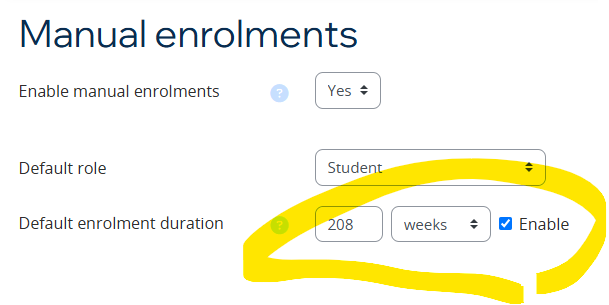
Now in the siteroot/global setting /admin/settings.php?section=enrolsettingsmanual for Manual enrolments you want to change this from the default of Keep user enrolled to Unenrol user from course

Now, you might be saying what could that do to my other courses !
Well further down this same settings page the following is also most likely to be set to 0, as that is Default

Meaning all your courses across your site with the enrolment method of Manual enrolments will have 0 set as the timeend value within enrolments.
To check what courses have manual enrolments with timeend not set to 0, run the following on the database
SELECT
    ue.id AS enrolment_id,
    u.username,
    u.firstname,
    u.lastname,
    c.shortname AS course_shortname,
    c.fullname AS course_name,
    u.lastaccess AS last_login_date,
    ue.timeend,
    FROM_UNIXTIME(ue.timeend) AS timeend_readable,
    FROM_UNIXTIME(ue.timestart) AS timestart_readable
FROM
    mdl_user_enrolments ue
JOIN
    mdl_enrol e ON ue.enrolid = e.id
JOIN
    mdl_course c ON e.courseid = c.id
JOIN
    mdl_user u ON ue.userid = u.id
WHERE
    e.enrol IN ('manual')
    AND ue.timeend != 0;
Now what you have to do is change the enrolments you want to get rid off, if over (in our case) 4 years to have a timeend of x and you can do this by using the enrolment timestart and adding on 4 years to timeend. Run the below SQL, first changing the e.courseid value to the course from above which you’ve set the Default enrolment duration on.
Make sure you test this on a UAT server first as well as backup your mdl_user_enrolments table
UPDATE
mdl_user_enrolments ue
JOIN mdl_enrol e ON ue.enrolid = e.id
SET ue.timeend = ue.timestart + (208 * 7 * 24 * 60 * 60)
WHERE e.courseid IN ('xxxxxx')
AND e.enrol IN ('manual')
AND ue.timeend = 0;
Once complete, watch the enrolments which are over 4 years magically disappear from your enrolment method.
Remove participants who have never engaged
If you want to remove the participants who have not engaged with the course then run the following SQL, first replacing 1732782442 and c.id, the unix time value can be found here, the one below is Thu Nov 28 2024 08:27:22 as long as the time is in the past to now then this will work.
The below SQL addresses the main 3 enrolments methods as you might want to work with more than just Manual.
 UPDATE
    mdl_user_enrolments ue
JOIN
    mdl_enrol e ON ue.enrolid = e.id
JOIN
    mdl_course c ON e.courseid = c.id
JOIN
    mdl_user u ON ue.userid = u.id
SET
    ue.timeend = '1732782442'
WHERE
    c.id IN ('xxxxxx')
    AND e.enrol IN ('manual','self','meta')
    AND u.lastaccess = 0;
All the best, if stuck – please leave a comment.
If you’d like more information or are having different problems which need solving, then why not have CoSector host your site for you.
Who we are
CoSector is the premier supplier of digital student experience solutions for the HE sector. We are the only provider created by a university for the benefit of universities. Check out the website above for more information.
Time for a change
Goodbye Manchester Metropolitan University, Hello CoSector / University of London

I’ve started a new job there as a Customer Success Consultant.
Amongst other things we host and manage Moodle installations mainly for the schools / colleges and university’s in the Higher Education sector.
We are currently walking our customers through the changes the move to Moodle 4.1 brings and helping them get the best from their Virtual Learning Environment.
Want to move to a professionally hosted platform, contact us.
Powershell : Cross reference IDs / UPNs with Azure Active Directory
Recently I needed to check that Moodle was suspending the correct users when allowing full control over accounts to the brilliant bit of Microsoft code plugins suite Office365 integration
As of the October 2021 release it still does odd things when running for the first time with the following setting switched on, if you use Transitive / Nested AD security group to control the access

So I wrote this piece of Powershell script to check each of the returned suspended IDs with whether those were still active in AAD or not.
#Connect-AzureAD
#Set-ExecutionPolicy -ExecutionPolicy RemoteSigned
#C:\ad-test\aad-crossreference.ps1 | Out-File C:\AD-Test\results.txt -width 132

$list = import-csv "c:\AD-Test\Moodle-Azure-AD-sync-run-231221.csv"

$i = 0
foreach($item in $list){

try
	{
	Get-AzureADUser -ObjectId $item.upn | select userprincipalname,accountenabled
	$i++
	} catch

		{
		#Write-Host $_.Exception.Message
		Write-Host -ForegroundColor Yellow $item.upn "not found"
		}
}

Write-Host "Found $i accounts"
The top 3 lines are commented out, they are just should you need them then run them separately at the powershell command prompt. The top two are required to use the script and the 3rd is the line I use to run the script itself, which is saved as aad-crossreference.ps1 and it outputs the result to a file ‘results.txt’.
In the file to check, make sure it starts with a column name of ‘upn’, like so

Hope this helps you out if you ever need to do something similar.
How to remove Moodle 4 site Home
Just a quick tip.
How to remove the site ‘Home‘ for logged in users in Moodle 4, when using the Moodle 4 BOOST theme

/* Hide the Home tab */
.primary-navigation li:nth-child(1) {
  display: none;
}
This can be added into the Raw SCSS text field in https://<Your-Moodle-site>/admin/settings.php?section=themesettingboost#theme_boost_advanced
Afterwards our Navigation bar now looks like this

Maybe on the full release of Moodle 4 there might be a toggle to remove it from the GUI as it is not useful to everyone.
Expect more of these nuggets to come as we work to releasing Moodle 4 to our users around June 2023
 Not so many...