jQuery Highlight Table Row ID

Covering a couple of issues which I encountered.

  • How to Highlight a row in a Table on click using jQuery
  • How to Only use the above code on that Table

Code:
$(document).ready(function() {
$("table#SearchResultsTable").on('click', 'tr', function () {
var state = $(this).hasClass('highlighted');
$('.highlighted').removeClass('highlighted');
if (!state) {
$(this).addClass('highlighted');
}
});
});

Code to use just your desired Table:
$("table#SearchResultsTable")

Hope the above helps you on your travels.

Simple JQuery Onclick within Visual Studio

I wanted to perform what I thought would be a simple task..

Select a Radio button and make this perform its task without submitting the form with an extra click on a button.

After much searching and trial and error I found that this task can be done with a simple extension to the radio button:

onClick = "$(this).closest('form').submit();"

Here it is in context:

@Html.Label("Student")

@Html.RadioButtonFor(model => model.RequiredFilter, "Student", new { @class = "radioAlignLeft", onClick = "$(this).closest('form').submit();" })

Hope it helps, if I had found this blog post it would have helped me!

CSS Media Queries Responsive Design

Are you designing a website to work on everything from a Desktop to an iphone
Then this information will help you get on your way.

The code below sets different states for different screen sizes, starting from 980px and smaller in the first section. The second section captures one which is 700px in width down to 481px, then 480px to 321px & finally iphone ‘tiny’ sized 320px and less sized screens.

To capture any larger screen resolutions down to 980px in width; then put these conditions outside of an @media section (Normal CSS rules apply).

Remember to work from the largest size to the smallest! Otherwise your screen will just display the first set of conditions.
This confused the hell out of me so I thought I’d blog about it.

CSS below…

/* for 980px or less */
@media screen and (max-width: 980px) {

#pagewrap {
    width: 94%;
}
#content {
    width: 65%;
}
#sidebar {
    width: 30%;
 }
}

/* for 700px or less */
@media screen and (max-width: 700px) {

 #content {
    width: auto;
    float: none;
}

 #sidebar {
    width: auto;
    float: none;
 }
}

/* for 480px or less */
@media screen and (max-width: 480px) {

 #header {
    height: auto;
}

 h1 {
    font-size: 24px;
}

 #sidebar {
    display: none;
 }
}

/* for 320px or less */
@media screen and (max-width: 320px) {

 #header {
    height: auto;
 }

 h1 {
    font-size: 24px;
 }

 #sidebar {
    display: none;
 }
}

IIS Redirect HTTP to HTTPS

We needed to redirect from HTTP to HTTPS as some of our sites weren’t yet updated to cope with HTTPS
So instead of doing it for all sites on our IIS server we needed to do it for one to start with and leave the others intact.

This is how we did that.

First thing you need is a IIS module which isnt installed as standard, URL Rewrite. Instead of just clicking the large green button which Microsoft would like you to do, scroll down and download just the file version that you need.

Once you’ve installed this, you will need to restart your IIS on that server, we have 3 which are load balanced, so had to install this module on all 3 and restart all 3 in order to see the icon.
URLrewrite

Hopefully Microsoft wont say you need to reboot the machine in order to install this, if you do get this message then you don’t have much choice apart from do what it is saying.

Okay, now launch the ‘URL Rewrite‘ module and do the following:

Add Rule(s)…‘ then select ‘Blank Rule‘.

Fill out the following as in the following screen, under ‘Match URL‘:

MatchURL

The regular expression is as follows:

^(resultsonline(($)|(/.+$)))

Where ‘resultsonline‘ replace this with the name of application you want to jump to HTTPS

A break down of the what the above regular expression is doing:

^ = The match must start at the beginning of the string or line.
$ = Match must occur at the end of the string
| = Matches any one element separated by the vertical bar
/.+$ = / is just a slash . means Any + one or more $ end of the line, so it has to equal “/something” rather than /.* would match “/” or “/something”

In the ‘Conditions‘ section, click ‘Add…‘ and enter:

Conditions

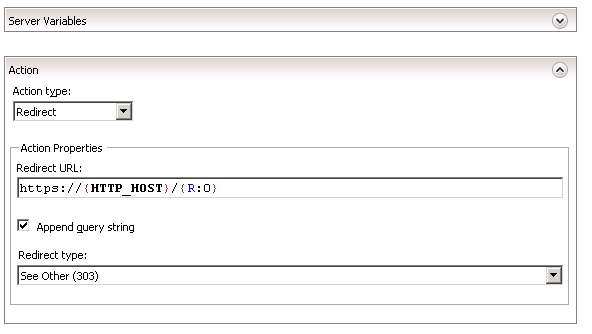
Then in the ‘Action‘ section, change the setting to:

Action

Click ‘Apply‘ to save the rule.

Include the above with a binding for HTTPS and http://www.server.com/resultsonline will redirect to https://www.server.com/resultsonline

If you want to redirect all your sites from HTTP to HTTPS then just change the regular expression to (.*)

Hope it helps.

Problems with IIS 7?

Are you pretty certain that you’re settings are correct within IIS7, but it’s still not playing ball?

Then try rebooting your server.

Yes I know this is a very drastic measure – but this was the only thing that worked for me.

Things you could check before is the Up Time of the server, in my case I’m using ‘Windows Server 2008 R2’ view this in your ‘Windows Task Manager’ under the ‘Performance’ tab.
My server was denying me access to a SQL server with the following error; which I knew existed and worked when using a local version:

[SqlException (0x80131904): A network-related or instance-specific error occurred while establishing a connection to SQL Server. The server was not found or was not accessible. Verify that the instance name is correct and that SQL Server is configured to allow remote connections. (provider: SQL Network Interfaces, error: 50 - Local Database Runtime error occurred. Cannot create an automatic instance. See the Windows Application event log for error details.
)]

I’m sure that having my server running for over a 150 days had caused it to get itself in to a tizz, with updates that had been installed but not running etc.

Log Parser Studio – User Agent Browser Query

See post below for Query which lists by Device.

This Query lists which Browser your users are accessing your site from.

Hope it helps you out – Feel free to post your versions.

/* List Browser types used */

select distinct
case strcnt(cs(user-agent),'Chrome') when 1 THEN 'Chrome' 
else case strcnt(cs(user-agent),'Firefox') when 1 THEN 'Firefox' 
else case strcnt(cs(user-agent),'MSIE+6') when 1 THEN 'IE 6'
else case strcnt(cs(user-agent),'MSIE+7') when 1 THEN 'IE 7'
else case strcnt(cs(user-agent),'MSIE+8') when 1 THEN 'IE 8'
else case strcnt(cs(user-agent),'MSIE+9') when 1 THEN 'IE 9'
else case strcnt(cs(user-agent),'MSIE+10') when 1 THEN 'IE 10'
else case strcnt(cs(user-agent),'IE+11') when 1 THEN 'IE 11'
else case strcnt(cs(user-agent),'+rv:11') when 1 THEN 'IE 11'
else case strcnt(cs(user-agent),'Opera') when 1 THEN 'Opera' 
else case strcnt(cs(user-agent),'Safari/') when 1 THEN 'Safari'
else case strcnt(cs(user-agent),'iPhone+OS+5') when 1 THEN 'Safari'
else case strcnt(cs(user-agent),'iPhone+OS+6') when 1 THEN 'Safari'
else case strcnt(cs(user-agent),'iPhone+OS+7') when 1 THEN 'Safari'
else case strcnt(cs(user-agent),'CPU+OS+6') when 1 THEN 'Safari'
else case strcnt(cs(user-agent),'iTunes/11') when 1 THEN 'iTunes'
else case strcnt(cs(user-agent),'iTunes/10') when 1 THEN 'iTunes'
ELSE 'Unknown' 
End
End
End
End
End
End
End
End 
End
End 
End 
End 
End 
End 
End
End 
End 
as Browser,
COUNT(c-ip) as Hits
FROM '[LOGFILEPATH]'

/* Dont display any cs(User-Agent) which are created by Bots */

WHERE cs(User-Agent) NOT LIKE '%Java%'
AND cs(User-Agent) NOT LIKE '%moodle%' 
AND cs(User-Agent) NOT LIKE '%twitter%' 
AND cs(User-Agent) NOT LIKE '%mymmu%'
AND cs(User-Agent) NOT LIKE '%MMU%'
AND cs(User-Agent) NOT LIKE '%admant%'
AND cs(User-Agent) NOT LIKE '%contextAd%' 
AND cs(User-Agent) NOT LIKE '%bingbot%'  
AND cs(User-Agent) NOT LIKE '%genieo%'
AND cs(User-Agent) NOT LIKE '%proximic%'
AND cs(User-Agent) NOT LIKE '%PageBot%'
AND cs(User-Agent) NOT LIKE '%feedfetcher%'
AND cs(User-Agent) NOT LIKE '%wordpress%'
AND cs(User-Agent) NOT LIKE '%PictureBot%'
AND cs(User-Agent) NOT LIKE '%WeSEE%'
AND cs(User-Agent) NOT LIKE '%Sogou%'
AND cs(User-Agent) NOT LIKE '%msnbot%'
AND cs(User-Agent) NOT LIKE '%Mediapartner%'
AND cs(User-Agent) NOT LIKE '%MagpieRSS%'
AND cs(User-Agent) NOT LIKE '%Affectv%'
AND cs(User-Agent) NOT LIKE '%Nutch%'
AND cs(User-Agent) NOT LIKE '%SkimBot%'
AND cs(User-Agent) NOT LIKE '%WhatWeb%'
AND cs(User-Agent) NOT LIKE '%Googlebot%'
AND cs(User-Agent) NOT LIKE '%Yahoo%'
AND cs(User-Agent) NOT LIKE '%Netcraft%'
AND cs(User-Agent) NOT LIKE '%AhrefsBot%'
AND cs(User-Agent) NOT LIKE '%SemrushBot%'
AND cs(User-Agent) NOT LIKE '%MJ12bot%'
AND cs(User-Agent) NOT LIKE '%DotBot%'
AND cs(User-Agent) NOT LIKE '%Vagabondo%'
AND cs(User-Agent) NOT LIKE '%NetSeer%'
AND cs(User-Agent) NOT LIKE '%PHP%'

/* Dont display any cs(User-Agent) which has an entry of nothing */

AND cs(User-Agent) is NOT NULL 

GROUP by Browser
ORDER by Hits DESC

Log Parser Studio – User Agent Platform / Device Query

I’ve been getting my head around using Log Parser Studio which is the GUI for Log Parser. A very powerful but annoyingly rubbish SQL based query creator which sieves through log files.

Its annoying as it doesn’t seem to completely like the syntax of SQL just little bits of it.

After much trial and error, I’ve finally got to together a starting point which scans through a logfile and splits it by IP address into the amount of hits from a particular device or platform.

So I thought I’d share it with the world.

Hope it helps you out – Feel free to post your versions.

Make sure you check out the post above for a Query which lists by Browser.

/* List Platform / Device types used */

select distinct
case strcnt(cs(user-agent),'Android') when 1 THEN 'Android' 
else case strcnt(cs(user-agent),'Windows+NT+6.3') when 1 THEN 'Windows 8.1' 
else case strcnt(cs(user-agent),'Windows+NT+6.2') when 1 THEN 'Windows 8' 
else case strcnt(cs(user-agent),'Windows+NT+6.1') when 1 THEN 'Windows 7'
else case strcnt(cs(user-agent),'Windows+7') when 1 THEN 'Windows 7'
else case strcnt(cs(user-agent),'Windows+NT+6.0') when 1 THEN 'Windows Vista'
else case strcnt(cs(user-agent),'Windows+Vista') when 1 THEN 'Windows Vista'
else case strcnt(cs(user-agent),'Windows+NT+5.2') when 1 THEN 'Windows Server 2003 / Windows XP x64 Edition' 
else case strcnt(cs(user-agent),'Windows+NT+5.1') when 1 THEN 'Windows XP' 
else case strcnt(cs(user-agent),'Windows+NT+5') when 1 THEN 'Windows 2000' 
else case strcnt(cs(user-agent),'Windows+NT+4') when 1 THEN 'Microsoft Windows NT 4.0' 
else case strcnt(cs(user-agent),'Windows+98') when 1 THEN 'Windows 98' 
else case strcnt(cs(user-agent),'Windows+95') when 1 THEN 'Windows 95' 
else case strcnt(cs(user-agent),'Windows+CE') when 1 THEN 'Windows CE'
else case strcnt(cs(user-agent),'Darwin/14') when 1 THEN 'iOS'  /* Darwin 14 iPad3+ & iOS7 */
else case strcnt(cs(user-agent),'Darwin/13') when 1 THEN 'iOS' /* Darwin 13 iPhone 4S */
else case strcnt(cs(user-agent),'iPhone') when 1 THEN 'iOS' /* iPhone */
else case strcnt(cs(user-agent),'iPad') when 1 THEN 'iOS' /* iPad */
else case strcnt(cs(user-agent),'OS+X') when 1 THEN 'Mac OSX' 
else case strcnt(cs(user-agent),'Symbian') when 1 THEN 'Symbian' 
else case strcnt(cs(user-agent),'Windows+Phone') when 1 THEN 'Windows phone' 
else case strcnt(cs(user-agent),'CrOS') when 1 THEN 'Chrome OS' 
else case strcnt(cs(user-agent),'Unix') when 1 THEN 'Unix' 
else case strcnt(cs(user-agent),'BlackBerry+') when 1 THEN 'BlackBerry'
else case strcnt(cs(user-agent),'BB10') when 1 THEN 'BlackBerry' 
/* else case strcnt(cs(user-agent),'iTunes') when 1 THEN 'iTunes application' */
else case strcnt(cs(user-agent),'Linux') when 1 THEN 'Linux' 
ELSE 'Unknown' 
End
End
End
End
End
End
End
End
End
End
End
End
End 
End 
End 
End 
End
/* When will it End? */
End
End 
End 
End 
End 
End
End 
End
End 
as Platform/Device,
COUNT(c-ip) as Hits
FROM '[LOGFILEPATH]'

/* Dont display any cs(User-Agent) which has an entry of nothing */

WHERE cs(User-Agent) is not NULL

/* Dont display any cs(User-Agent) which are created by Bots */

 AND cs(User-Agent) NOT LIKE '%java%'
 AND cs(User-Agent) NOT LIKE '%moodle%'
 AND cs(User-Agent) NOT LIKE '%twitter%'
 AND cs(User-Agent) NOT LIKE '%mymmu%'
 AND cs(User-Agent) NOT LIKE '%MMU%'
 AND cs(User-Agent) NOT LIKE '%ADmant%'
 AND cs(User-Agent) NOT LIKE '%contextAd%' 
 AND cs(User-Agent) NOT LIKE '%bingbot%'  
 AND cs(User-Agent) NOT LIKE '%genieo%' 
 AND cs(User-Agent) NOT LIKE '%proximic%'
 AND cs(User-Agent) NOT LIKE '%PageBot%' 
 AND cs(User-Agent) NOT LIKE '%feedfetcher%'
 AND cs(User-Agent) NOT LIKE '%wordpress%'
 AND cs(User-Agent) NOT LIKE '%PictureBot%'
 AND cs(User-Agent) NOT LIKE '%WeSEE%'
 AND cs(User-Agent) NOT LIKE '%Sogou%'
 AND cs(User-Agent) NOT LIKE '%msnbot%'
 AND cs(User-Agent) NOT LIKE '%Mediapartner%'
 AND cs(User-Agent) NOT LIKE '%MagpieRSS%'
 AND cs(User-Agent) NOT LIKE '%Affectv%'
 AND cs(User-Agent) NOT LIKE '%Nutch%'
 AND cs(User-Agent) NOT LIKE '%SkimBot%'
 AND cs(User-Agent) NOT LIKE '%WhatWeb%'
 AND cs(User-Agent) NOT LIKE '%Googlebot%'
 AND cs(User-Agent) NOT LIKE '%Yahoo%'
 AND cs(User-Agent) NOT LIKE '%Netcraft%'
 AND cs(User-Agent) NOT LIKE '%AhrefsBot%'
 AND cs(User-Agent) NOT LIKE '%SemrushBot%'
 AND cs(User-Agent) NOT LIKE '%MJ12bot%'
 AND cs(User-Agent) NOT LIKE '%DotBot%'
 AND cs(User-Agent) NOT LIKE '%Vagabondo%'
 AND cs(User-Agent) NOT LIKE '%NetSeer%'
 AND cs(User-Agent) NOT LIKE '%PHP%'
GROUP by Platform/Device
ORDER by Hits DESC

How to do a Mail Merge – With more than one record per page

*** UPDATE 2021 *** The below has helped a lot of people out over the years since it was written in 2013. I’ve recently had a much more advanced email merge to contend with, so inserting the link to that post here.

Advanced Mail Merge : Multiple clickable URL entries per mail to user

I opted to learn how to use the mail merge features of MS Word linked to Excel, as each year my wife goes on about the hassles that she gets whilst trying to mail 4000 people & how difficult it is to get it right.

So this is what I learnt as I cracked the issues that she couldn’t, so this time next year her job will be that much easier.

I thought I’d add it as a blog post for two reasons, first to help you and second to remind me how to do it.

The first thing you need to do a mail merge is some data in Excel, I made up the following:

mailmerge-excel

Next launch Word and write a letter.

Next click the Mailings tab, Start Mail Merge drop down and select Step by Step Mail Merge Wizard

Now for the fun bit, work your way through the wizard, select an your Excel file to use & add to the existing letter an Address Block from the left menu, this will add in the address for each person, then choose a Greeting Line both of these two options reduces the amount of work that you have to put into your letter and personalises it to the max.
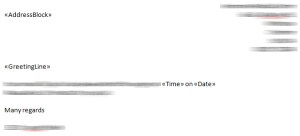
mailmerge-word

Now to cover one of problems my wife was having, she wanted to being able to have 3 letters printed to 1 page, thus saving on paper. if you just copy and paste the text 3 times on the one Word document then this doesn’t work, it’ll just repeat the same persons name and address 3 times.

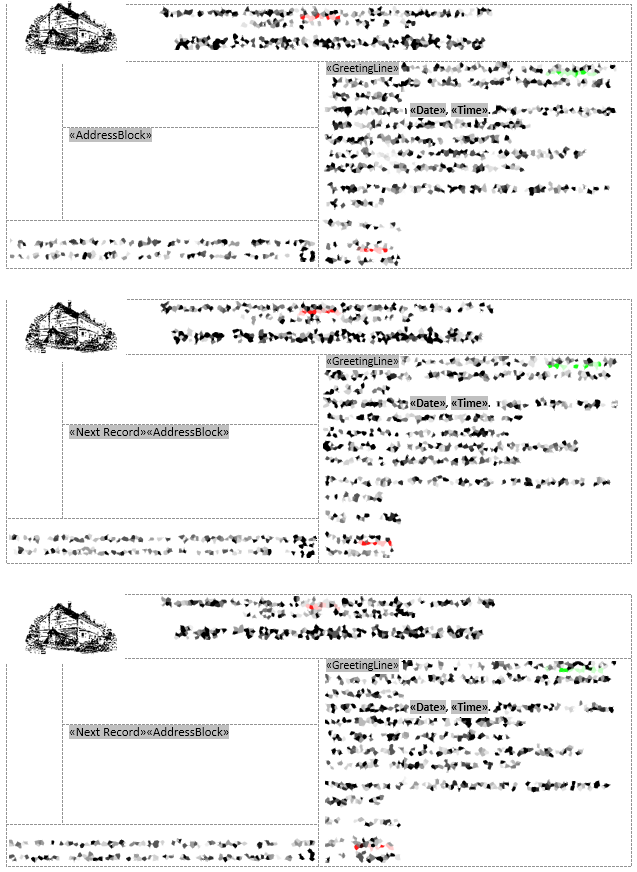
The way you get around this is by requesting the next record, do this by marking the start of the next block with «Next Record»

before the request for «AddressBlock», so you’ll have your next record starting with:

«Next Record»«AddressBlock»

Time format, by default you’ll get all sorts of weird time formats. To change what time format gets displayed you need to editing the field code with Edit Field… this is available by selecting it on a right click on the current field, in this case on the merge field marked «Time» Then Field Codes button and add the following to get just the hours without any seconds.

MERGEFIELD Time \@ "HH:mm"

The above information mixed with a little bit of trial and error with make you a master at the Mail Merge functionality of MS Office.

Top Tip: If at any point you feel that the Mail Merge Wizard is not doing what you ask it to do, then it most probably isn’t. Its a complete wind up and learning how to do a mail merge by using the menu bar tools is the best advice I can give.

Second Top Tip: If at any point you want to remove the mail merge information from the word document, do so by opening the document, click on the Mailings tab, click the down arrow under the Start Mail Merge button, click on Normal Word Document. This will disconnect the Word document from the source document.

If you get a date out as 1899 then read this to explain all and fix the issue

Image below shows how I manage to get multiple postcards on one page, each postcard reads a separate record:
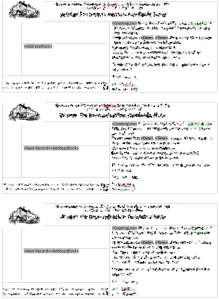
MailMerge-ImageClick image to enlarge, it’ll show that I have «AddressBlock» , «GreetingLine» , «Date» , «Time» inserted into the merge, each postcard is in a Text box, with smaller text boxes inside. This then keeps each merge record together, so when a «NextRecord» is called it knows where to put the details without missing any information. Like the issue that Karen is having below, if you read the comments.

Blackboard Administrator – Success!

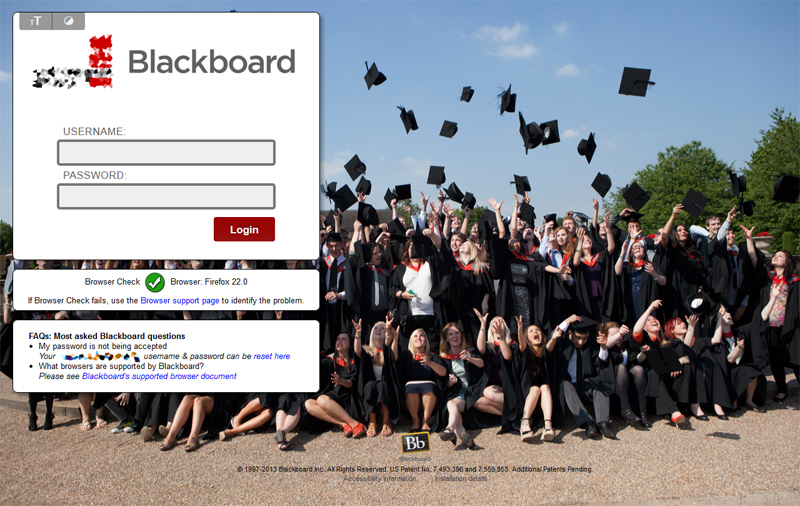
Do you want your institutional Blackboard to look this good?

Front-image  inside  cc  new-front

help

I’ve just completed the two Blackboard accreditation’s, one in ‘Community & Engagement Administration certification’ & the other in ‘Content Management GUI Administrator certification’, April & May 2013.

93% in both exams

Blackboard UK en_GB language pack

I’ve have recently rewritten our Blackboard English language pack for the University which currently employs me. If anyone knows the in’s and out’s of the Blackboard language pack, they’ll know that this is a long and arduous task to perform.

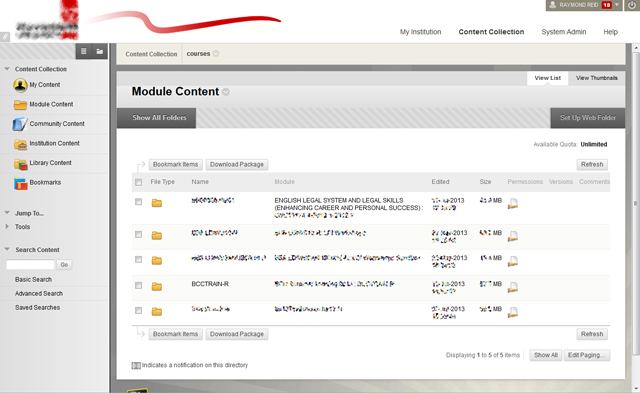
Blackboard out the of box is set up for the American school system marketplace and it’s language reflects this. Within the English University system we call Courses – Modules, Modules – Widgets and Organisations – Communities. This pack is available for you’re Institution without having to pay Blackboard an astronomical fee to change it for you. Why should you have to go through all the 120,000 plus changes that I’ve already performed.

The immediate feedback that I’ve received from our academics at our institution is that of rejoice. “Finally the words we use day to day are now reflected in Blackboard.”

If you’d like it, get in touch.