Mass unenrol using core settings in Moodle
Do you have a course within Moodle which now has so many participants that it has become impossible to maintain? You may have even got as far as attempting to use bulk unenrolment methods, only to find that the frontend of Moodle crashes when trying to delete too many users.
Using the following steps you can use Moodle internal systems to remove the ones which you no longer want to have access.
First off edit the enrolment method used to bring in these users, in our case that was via Manual enrolments
To do this you want to add a Default enrolment duration to this course visit siteroot/enrol/instances.php?id=xxxxxx, and add a number, the below 208 weeks is 4 years.
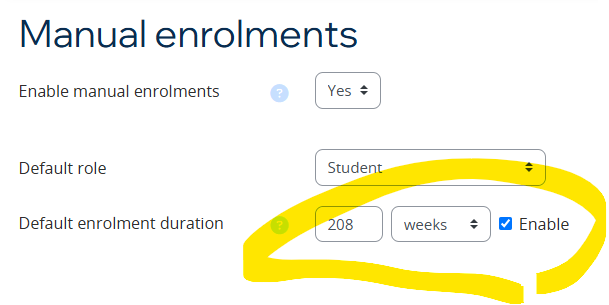
Now in the siteroot/global setting /admin/settings.php?section=enrolsettingsmanual for Manual enrolments you want to change this from the default of Keep user enrolled to Unenrol user from course

Now, you might be saying what could that do to my other courses !
Well further down this same settings page the following is also most likely to be set to 0, as that is Default

Meaning all your courses across your site with the enrolment method of Manual enrolments will have 0 set as the timeend value within enrolments.
To check what courses have manual enrolments with timeend not set to 0, run the following on the database
SELECT
    ue.id AS enrolment_id,
    u.username,
    u.firstname,
    u.lastname,
    c.shortname AS course_shortname,
    c.fullname AS course_name,
    u.lastaccess AS last_login_date,
    ue.timeend,
    FROM_UNIXTIME(ue.timeend) AS timeend_readable,
    FROM_UNIXTIME(ue.timestart) AS timestart_readable
FROM
    mdl_user_enrolments ue
JOIN
    mdl_enrol e ON ue.enrolid = e.id
JOIN
    mdl_course c ON e.courseid = c.id
JOIN
    mdl_user u ON ue.userid = u.id
WHERE
    e.enrol IN ('manual')
    AND ue.timeend != 0;
Now what you have to do is change the enrolments you want to get rid off, if over (in our case) 4 years to have a timeend of x and you can do this by using the enrolment timestart and adding on 4 years to timeend. Run the below SQL, first changing the e.courseid value to the course from above which you’ve set the Default enrolment duration on.
Make sure you test this on a UAT server first as well as backup your mdl_user_enrolments table
UPDATE
mdl_user_enrolments ue
JOIN mdl_enrol e ON ue.enrolid = e.id
SET ue.timeend = ue.timestart + (208 * 7 * 24 * 60 * 60)
WHERE e.courseid IN ('xxxxxx')
AND e.enrol IN ('manual')
AND ue.timeend = 0;
Once complete, watch the enrolments which are over 4 years magically disappear from your enrolment method.
Remove participants who have never engaged
If you want to remove the participants who have not engaged with the course then run the following SQL, first replacing 1732782442 and c.id, the unix time value can be found here, the one below is Thu Nov 28 2024 08:27:22 as long as the time is in the past to now then this will work.
The below SQL addresses the main 3 enrolments methods as you might want to work with more than just Manual.
 UPDATE
    mdl_user_enrolments ue
JOIN
    mdl_enrol e ON ue.enrolid = e.id
JOIN
    mdl_course c ON e.courseid = c.id
JOIN
    mdl_user u ON ue.userid = u.id
SET
    ue.timeend = '1732782442'
WHERE
    c.id IN ('xxxxxx')
    AND e.enrol IN ('manual','self','meta')
    AND u.lastaccess = 0;
All the best, if stuck – please leave a comment.
If you’d like more information or are having different problems which need solving, then why not have CoSector host your site for you.
Who we are
CoSector is the premier supplier of digital student experience solutions for the HE sector. We are the only provider created by a university for the benefit of universities. Check out the website above for more information.
 Not so many...