Not so many…
Home | Pages | Archives
Oracle Scheduler Jobs and Email Notifications vs crontab
August 31, 2018 11:23 am
Question: How do I run scheduled jobs and get a notification via email?
The above is something that our business does all the time, but the answer was, to do that you’ll have to create a crontab direct job on the server.
I thought surely not.. So I thought about it and with a bit of Googling I figured out that the above wasn’t true, it’s possible to do these as scheduled jobs in SQL Developer.
Create Stored Procedure
- In SQL Developer create a new Procedure
- Right click on ‘Procedures’ and select ‘New Procedure’, give it a logical name describing what it does, spaces are not allowed, use underscores.
- Type in your SQL over where the blank Procedure template says ‘NULL;’
Create Scheduled Job
Or jump straight to creating the job if you want to run a block of SQL which doesn’t suit being a Procedure, you can put the SQL directly into the job.
- Go to the Schema in your database which has the rights to run a scheduled job
- Under there expand ‘Scheduler’ and ‘Jobs’, right click on ‘Jobs’ and select ‘New Job (Wizard)…’
- Fill in the field like below
- Use logical names and give a full description of what the job is doing
- Either put the SQL in directly in ‘PL/SQL Block’ or select the Procedure you created
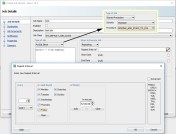
When to execute the job?
- use the ‘When to Execute Job’ drop-down to select ‘Repeating’ and click the pencil this will make the ‘Repeat Interval’ dialog box appear, shown above
- Select required time and days for the job to run, click ‘OK’.
- I selected Daily as well as the actual days, just to be sure 🙂
- Once happy with your choices click ‘Next >’
- Set Destination to ‘Local’ for it to run on the server, click ‘Next >’
- Skip over ‘Job Arguments’ to ‘Notification’
- Now add in ‘job_succeded’ just whilst you are checking the whether your emails are working when the job ran, add it by holding down Ctrl and clicking it, otherwise you will lose your current default options of : job_broken, job_chain_stalled, job_failed, job_over_max_dur, job_sch_lim_reached
- Move Date: %event_timestamp% from the body to the bottom, as I’ve noticed that it doesn’t create a carriage return after it so will bunch up all the notification output.
- Also fix the line Error code: by moving the end % back up a line from Error message. This might be a bug on my version of SQL Developer and will be fixed on yours.
From like this:
Retry count: %retry_count%
Error code: %error_code
%Error message: %error_message%
To like this:
Retry count: %retry_count%
Error code: %error_code%
Error message: %error_message%
- Now Next through the rest of the setting and click ‘Finish’
How to Set up the email side of things
- Edit and run the following SQL using your System account
BEGIN

DBMS_SCHEDULER.set_scheduler_attribute('email_server', 'outlook.blah.co.uk:25');
DBMS_SCHEDULER.set_scheduler_attribute('email_sender', 'noreply@blah.co.uk');

END;
That should be it, all that is left to do is to run your job. You can do that by right clicking the job and selecting ‘Run Job…’
Now when people start to automate jobs, they will be visible to your whole team, rather than hidden away on the server in a crontab.
Posted by Raymond Reid
Categories: Windows
Tags:
« Older Newer »
Leave a Reply
Mobile Site | Full Site
Get a free blog at WordPress.com Theme: WordPress Mobile Edition by Alex King.