October 15, 2019 8:55 am
I’ve seen this issue twice now on two different Moodle setups where the required access to read from the Azure Active Directory Graph API (AAD Graph) hasn’t been granted on setting up the app registration through Moodle.
Error received:
AADSTS650056: Misconfigured application. This could be due to one of the following: The client has not listed any permissions for ‘AAD Graph’ in the requested permissions in the client’s application registration.
I think there is possibly a bug in the latest version of the Office 365 and Azure Active Directory plugins for Moodle
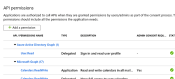
I didn’t have this problem when setting our app registration up, but I did in from within Azure not by using the ‘Provide Admin Consent’ button from Moodle’s Microsoft Office 365 Integration setting in local plugins.
The below is how your app registration in Azure should be:
Also check the mdl_auth_oidc_token table and delete any rows which have userid of 0
select * from mdl_auth_oidc_token where userid = '0';
Posted by Raymond Reid
Categories: Windows
Tags:
Mobile Site | Full Site
Get a free blog at WordPress.com Theme: WordPress Mobile Edition by Alex King.
where to find mdl_auth_oidc_token table?
By ciuba on October 28, 2019 at 11:02 am
It’s a table on the Moodle database
By Raymond Reid on October 28, 2019 at 11:05 am
can you share a path where it usually is?
By ciuba on October 28, 2019 at 11:35 am
Hi Ciuba, it’s on the MySQL moodle database. I use MySQL workbench to access it.
select * from mdl_auth_oidc_token
or
select * from mdl_auth_oidc_token where userid = ‘0’;
By Raymond Reid on October 28, 2019 at 1:17 pm
Hello,
how could I add Azure Active Directory Graph permission manually?
By Mark on October 29, 2019 at 1:12 pm
Hi Mark, in Azure portal, find your App Registration for Moodle then the API permissions & Add a permission for Azure Active Directory Graph.. it ‘should’ be very simple. I’ll try and add detailed instructions later if you still cannot find out how to do it.
By Raymond Reid on October 29, 2019 at 3:01 pm
you are great! This is not documented on manual steps so I did not have it and had this exact same error .Thanks again
By Ilias Drosos on October 13, 2020 at 2:59 pm
[…] my original post here on how to setup the app registration in Azure here then head to /admin/settings.php?section=local_o365 within the Moodle instance which you want to […]
By How to Change Moodle Azure AD Tenancy | Not so many... on January 28, 2021 at 10:34 am