
February 26, 2011 10:54 am
DirectFolders is an application that makes file system folder navigation quick and easy. It’s sweet spot is when you’ve got deeply nested folders. You can create bookmarks for them which are accessible via hotkeys anytime, anyplace.
Xplorer2 is a powerful, extensively customisable replacement for Windows Explorer. The Windows 7 native Explorer specialises in making life hard for anyone using it so turned to Xplorer2 for the sake of my mental health.
There are free ‘lite’ versions of both applications and they are well worth a test drive.
By default, DirectFolders launches the native Windows Explorer but it can be configured to launch Xplorer2 instead.
To get DirectFolders to launch Xplorer2:
After making the changes above, DirectFolders will launch it’s shortcuts in Xplorer2 but it will create a new instance of Xplorer2 for each launch. To make the folders appear as new tabs in the same Xplorer2 instance do the following:
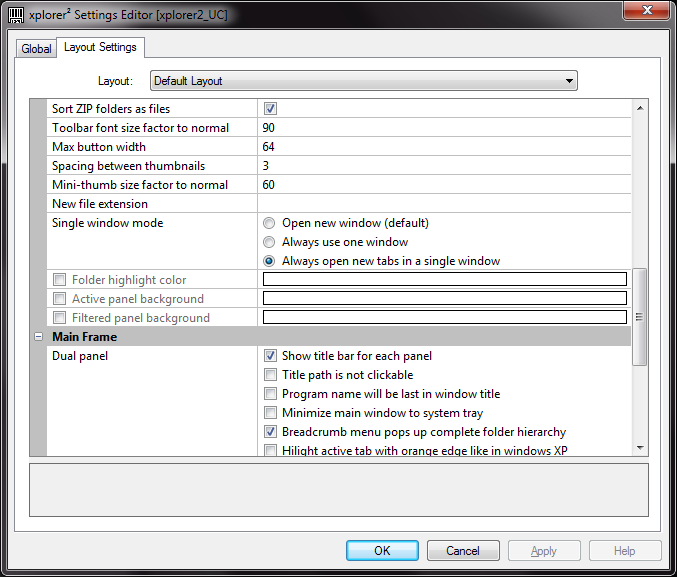
Xplorer2 has a lot of shortcut functionality built in, so you could manage folder navigation entirely within it. I’m so comfortable with DirectFolders having used it for years that it suits me better to integrate the two.
Posted by Sam Rowley
Categories: Xplorer2
Tags:
Mobile Site | Full Site
Get a free blog at WordPress.com Theme: WordPress Mobile Edition by Alex King.
What’s up, all the time i used to check blog posts here early in the morning, for the reason that i enjoy to learn more and more.
By serwer vps vps vds cloud vps on January 19, 2013 at 3:11 am